

I wanted to see what every device on my home network is doing: who’s using the bandwidth, what’s talking to the internet, and whether anything new has turned up. ntopng can show all of that, and my FRITZ!Box can feed it without any extra hardware. It worked brilliantly for a few hours. Then it flooded my inbox, and then I found out it was slowing my internet to a crawl.
The idea: let the router do the capturing
To see every device’s traffic, a monitoring tool has to see every packet. Normally that means a managed switch that copies traffic to a spare port, or putting a box in the middle of the network.
The FRITZ!Box has a less well-known trick: a packet-capture page, meant for support diagnostics. It can stream everything crossing the router’s LAN side, including all the Wi-Fi devices and the mesh repeater. I wrote a small script, running in Docker on the home server, that logs into the FRITZ!Box, opens that stream, and replays every packet onto a virtual network card. ntopng watches that card as if it were plugged into the network.
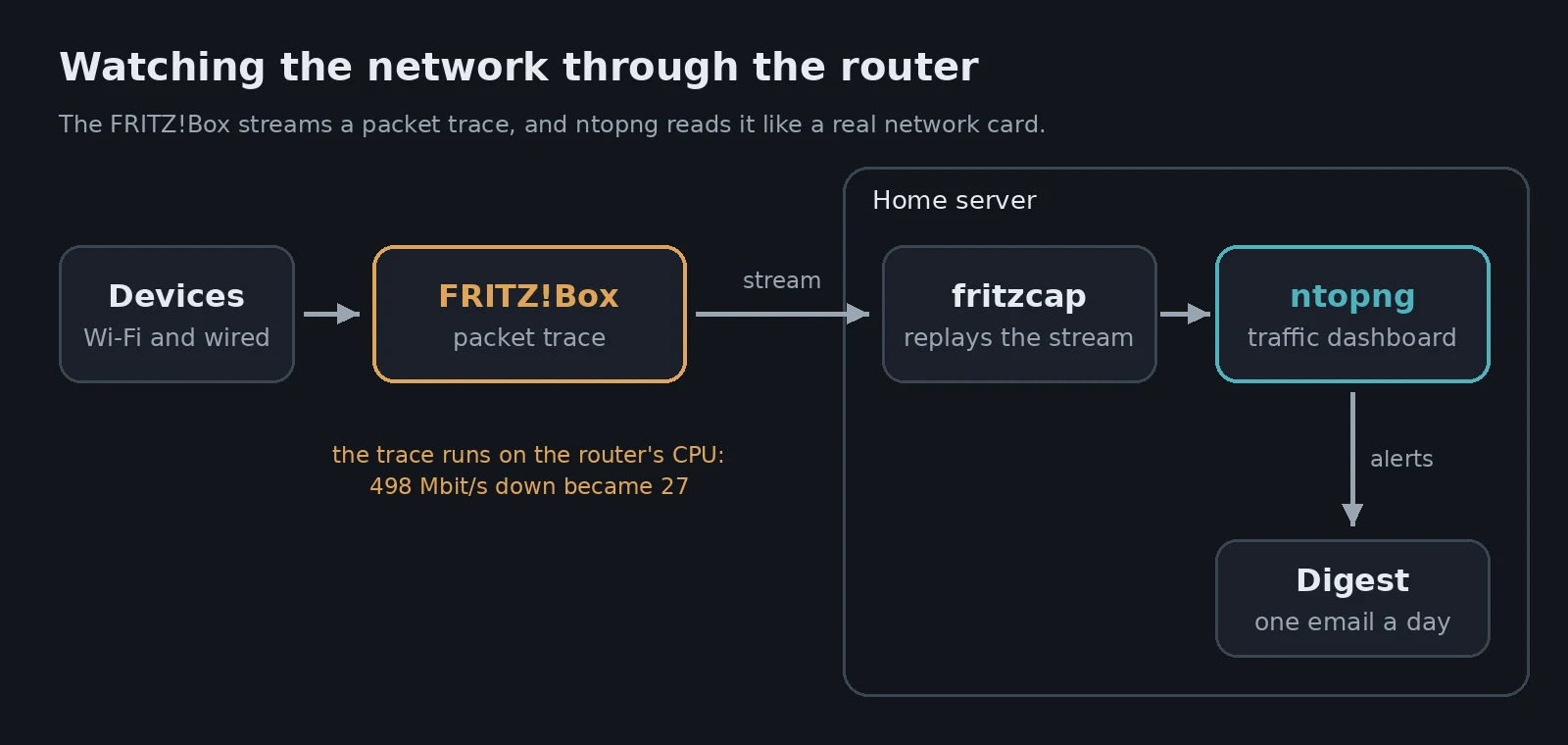
A few things I learned along the way:
- The capture isn’t standard pcap. The FRITZ!Box adds 8 extra bytes to every packet header, with a different file signature. The script strips them before replaying.
- There’s a hidden username. The login page only asks for a password, but the box has an auto-generated username (
fritzplus four digits) that scripts need. - Names matter. A list of MAC addresses is useless, so a second container copies the device names I’d set in the FRITZ!Box into ntopng every few minutes. It also names IPv6 addresses by matching their MAC.
For a few hours, it was great. I could see which device was using the bandwidth, which apps, and a timeline of every connection.
Problem 1: about 500 alerts in three hours
ntopng has built-in alerts, and I set them to email me anything at “error” level or above. I was out for the afternoon. When I got back, I had more than 100 emails.
ntopng had raised about 500 alerts in three hours, and roughly 95% of them were the same thing: random scanners on the internet poking at the services I forward from the router (Plex, and a couple of services on the Pi). That’s normal background noise for any home with open ports. It’s not an attack on me in particular, and it’s nothing ntopng can fix.
Warning Before you connect any monitoring tool to email or phone alerts, count how many alerts it actually produces over a few hours. Mine looked quiet in the dashboard and was anything but in my inbox.
I turned off ntopng’s own emails and wrote a small digest instead:
- One summary email a day at 8am: the busiest devices, the top apps, and a count of alerts, split into inbound noise and anything going out.
- Instant emails only for things worth acting on: a device on my network making a seriously suspicious connection outwards, a rogue DHCP server, or a brand new device joining the network.
- Limits. The same alert only emails once a day, and never more than six an hour. Anything over that goes into the next digest.
When I replayed the previous 24 hours of alerts through those rules, it would have sent one instant email instead of over 100.
Tip If you use ntopng’s email alerts, give the recipient an empty CC field. Without one, the version I ran crashed while building each email and dropped it without any error you’d notice.
Problem 2: the router couldn’t keep up
While the capture was running, the FRITZ!Box web page had become slow to load. So I ran a speed test with the capture on, then again with it off:
| Capture on | Capture off | |
|---|---|---|
| Download | 27 Mbit/s | 498 Mbit/s |
| Upload | 40 Mbit/s | 47 Mbit/s |
| Latency under load | 228 ms | 16 ms |
That’s over 90% of my download speed gone, with the FRITZ!Box processor sitting at 64–68%. The packet trace runs on the router’s main processor, and copying every packet in software is more than it can do while routing at full speed. On a quiet network it barely showed. With real traffic, it hurt.
There was a second, quieter problem. When I tested a few devices at once, the wired PCs’ traffic was mostly missing. The FRITZ!Box routes wired traffic through a hardware fast path, so I suspect much of it never reaches the trace at all. A monitor that slows the network and only sees part of it isn’t a good deal.
Where it stands now
The whole ntopng setup is stopped. Everything’s kept, including the device names, settings and history, so I can start it for a short session when I want to look at something, then switch it off again. The capture is the only part that costs anything, and it stays off unless I’m actively using it.
The proper fix for always-on monitoring is a managed switch that copies the router’s traffic to a spare network card on the server (port mirroring). I have a spare TP-Link TL-SG105E that can do it, so that’s the next experiment. The router would go back to just routing, and the server would do all the work.
What I took away from it
- Free features have a cost somewhere. The FRITZ!Box capture needs no extra hardware, but the router pays for it in speed.
- Measure the impact. A quick speed test with the feature on and then off told me more than any CPU graph.
- Count alerts before you email them. Then filter and summarise them. The same lesson as my DNS watchdog: alerts are only useful if you still read them.
If you have a FRITZ!Box, it’s also worth reading how I use its built-in WireGuard VPN, a feature that costs it nothing noticeable.
Leave a Reply