

Earlier today I moved my home network’s DHCP from the FRITZ!Box to Technitium on my Raspberry Pi, and updated Technitium while I was at it. That evening I noticed DHCP wasn’t working. Docker insisted the container was “Up”. It was up, it just wasn’t doing anything. Here’s what went wrong, and the three things I set up so it can’t quietly catch me out again.
What happened
Four minutes after the update to version 15.6.2, Technitium crashed with an internal .NET error (BadImageFormatException: Bad IL range). Normally a crashed program exits, Docker notices, and restart: unless-stopped brings it straight back. This one didn’t exit. It got stuck spinning at full CPU, so as far as Docker was concerned, everything was fine.
In reality, everything Technitium does on the Pi had stopped:
- DHCP: requests from devices were piling up unanswered.
- DNS: the Pi stopped answering lookups.
- The web console: wouldn’t load.
Why I didn’t notice for hours
Ironically, because the rest of my setup did its job. I run Technitium on two hosts, and every device has both as DNS servers, so lookups quietly moved over to the home server. DHCP leases last 10 days, so devices that already had an address kept it. Only something joining the network, or renewing its lease, would hit the problem.
That’s the uncomfortable lesson: redundancy hides failures too. Without an alert, a backup system just means you find out later.
Finding the problem
The first clue was on the Pi itself. ss shows how much data is waiting unread on each socket:
ss -uln | grep ':67'The Recv-Q column for port 67, the DHCP port, showed around 200 KB of requests sitting there. On a healthy server it’s 0. Something was holding the port but not reading from it.
The container logs showed the crash four minutes after start-up, with no restart since. Before blaming software, I checked for storage errors with dmesg and for power problems with vcgencmd get_throttled. Both were clean, so it wasn’t failing hardware.
The fix was one command:
docker restart technitiumDNS was answering again six seconds later. To prove DHCP was working, not just listening, I sent a real DHCP request from another machine with nmap, which runs fine as a throwaway container:
docker run --rm --net=host instrumentisto/nmap --script broadcast-dhcp-discoverIt came back with an address offer from the Pi, along with the right gateway and both DNS servers.
Fix 1: a healthcheck that actually checks something
Docker can’t tell “running” from “working” unless you tell it how. A healthcheck is a command Docker runs inside the container on a timer; if it fails a few times in a row, the container is marked unhealthy. I added this to Technitium’s compose.yaml on the Pi:
    healthcheck:
      # Answers from the built-in localhost zone, so it does not depend on the internet.
      test: ["CMD", "dig", "+short", "+time=3", "+tries=1", "@127.0.0.1", "localhost", "A"]
      interval: 30s
      timeout: 5s
      retries: 3
      start_period: 60s
It asks Technitium for localhost, which it answers from a built-in zone, so an internet outage doesn’t make it look broken. Now docker ps and Portainer show healthy or unhealthy instead of a misleading “Up”.
One catch: plain Docker only labels an unhealthy container. It doesn’t restart it. That needs something else.
Fix 2: a watchdog that restarts it
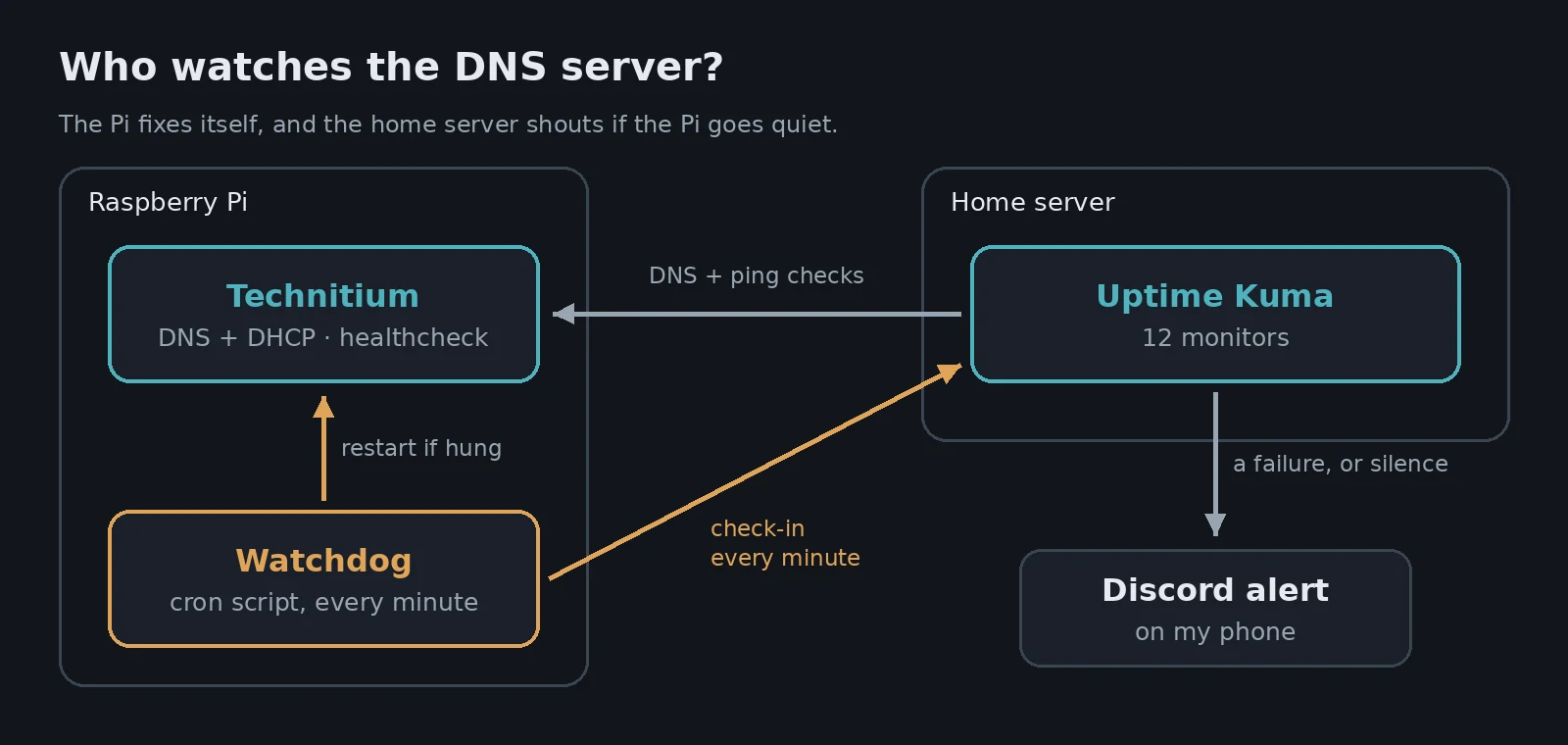
A small shell script on the Pi runs every minute from cron. It restarts Technitium if:
- the healthcheck says unhealthy, or
- DHCP requests are still piling up on port 67 a minute after it first saw them (one full queue can just be a burst), or
- nothing is listening on the DHCP port at all.
Here’s the heart of it:
health=$(docker inspect -f '{{.State.Health.Status}}' technitium)
queue=$(ss -Huln 'sport = :67' | awk '{print $2}' | sort -n | tail -1)

if [ "$health" = unhealthy ] || [ "${queue:-0}" -gt 16384 ]; then
    docker restart -t 20 technitium
fi
The real script adds logging, the “still stuck a minute later” check, and a limit of one restart every 15 minutes. Then it’s scheduled with one crontab line:
* * * * * $HOME/bin/technitium-watchdog.shTip Always put a limit on automatic restarts. If an update is genuinely broken, a watchdog without one will restart it every minute forever, and hide the real problem from you.
Fix 3: Uptime Kuma, so I actually hear about it
Self-healing is great, but I still want to know when something breaks. Uptime Kuma is a self-hosted monitoring dashboard: it checks your services on a schedule and sends an alert when one fails. I run it on the home server, not the Pi, so the two machines keep an eye on each other.
services:
  uptime-kuma:
    image: louislam/uptime-kuma:1
    container_name: uptime-kuma
    restart: unless-stopped
    network_mode: host
    volumes:
      - ./data:/app/data
    environment:
      TZ: Europe/Dublin
The :1 tag is deliberate. Watchtower keeps it updated within version 1, but won’t jump to the big 2.x upgrade without me choosing to.
Alerts go to the same Discord channel Watchtower already posts to, so everything lands on my phone in one place. I set up 12 monitors:
| What | Checks |
|---|---|
| DNS | Technitium on both servers resolves a real name |
| DHCP | The Pi’s watchdog checks in every minute |
| Devices | The Pi and the FRITZ!Box answer ping |
| Public | This blog over HTTPS, and the mail server’s ports |
| Services | Vaultwarden, Immich, Nextcloud and Plex |
The clever bit: alerting on silence
Most monitors work by Uptime Kuma checking something. The DHCP one is a push monitor, which works the other way round: every time the watchdog runs and finds everything healthy, it visits a secret URL on Uptime Kuma to say “all OK”. If those check-ins stop for a couple of minutes, Uptime Kuma raises the alarm.
That’s what makes it work even when the Pi is in real trouble. A Pi that’s frozen, overloaded or unplugged can’t send anything, and the silence is the alert. It’s also better than ping: a badly overloaded machine can still answer ping while doing nothing useful, but it can’t run a script and make a web request.
When the watchdog does restart Technitium, it reports that too, so I get a Discord message saying exactly what it fixed.
One gotcha: Docker networks and DNS
My first try put Uptime Kuma on a normal Docker network, and the home server’s Technitium refused its lookups. The checks came from a Docker network address, and Technitium only answers my home network. Rather than loosen Technitium’s rules, I switched Uptime Kuma to network_mode: host, so its checks come from the server’s own address like any other device.
Warning Uptime Kuma can’t tell you if the machine it runs on goes down. Run it somewhere other than the thing you care about most. Mine is on the home server, watching the Pi, and the Pi’s watchdog keeps DHCP alive either way.
What I took away from it
- “Up” doesn’t mean working. Give every important container a healthcheck that tests what it actually does.
- Redundancy needs alerts. My second DNS server saved me, and also hid the problem for hours.
- Test after updates. I’d taken a settings backup before updating, which was reassuring, but a quick DNS and DHCP check afterwards would have caught this in minutes.
- Watch for silence, not just errors. A push monitor catches the failures where nothing is left running to complain.
Total cost: a few lines of YAML, a short shell script and one more container. Next time Technitium has a bad day, it’ll be fixed before I notice, and I’ll still get a message telling me it happened.
Leave a Reply