

I wear a Huawei Watch GT Runner every day, and it records a lot: steps, heart rate, sleep stages, blood oxygen and every run. All of it lives inside the Huawei Health app, and Huawei doesn’t offer a way to send it anywhere else. So I built a route to get it onto my home server, and onto my dashboard, without giving up the Huawei app.
The problem with Huawei Health
The Huawei app is fine for looking at the data on the phone. What it doesn’t do is share. There’s no API, no automatic export, and it doesn’t write to Health Connect, Android’s shared store for health data. I wanted three things:
- a page on my own server showing my steps, sleep and resting heart rate over weeks, not just today;
- a small tile for my Homarr dashboard, next to everything else;
- the data stored at home, in a file I control.
Two ways to get the data out
Gadgetbridge is an open-source app that talks to the watch directly over Bluetooth, instead of the Huawei app. It can export its database automatically, and I set that up first: the export syncs to the server with Syncthing, and a script reads the Huawei tables out of it. It works, but Gadgetbridge has to replace the Huawei app as the watch’s phone app, and I didn’t want to lose Huawei’s own features.
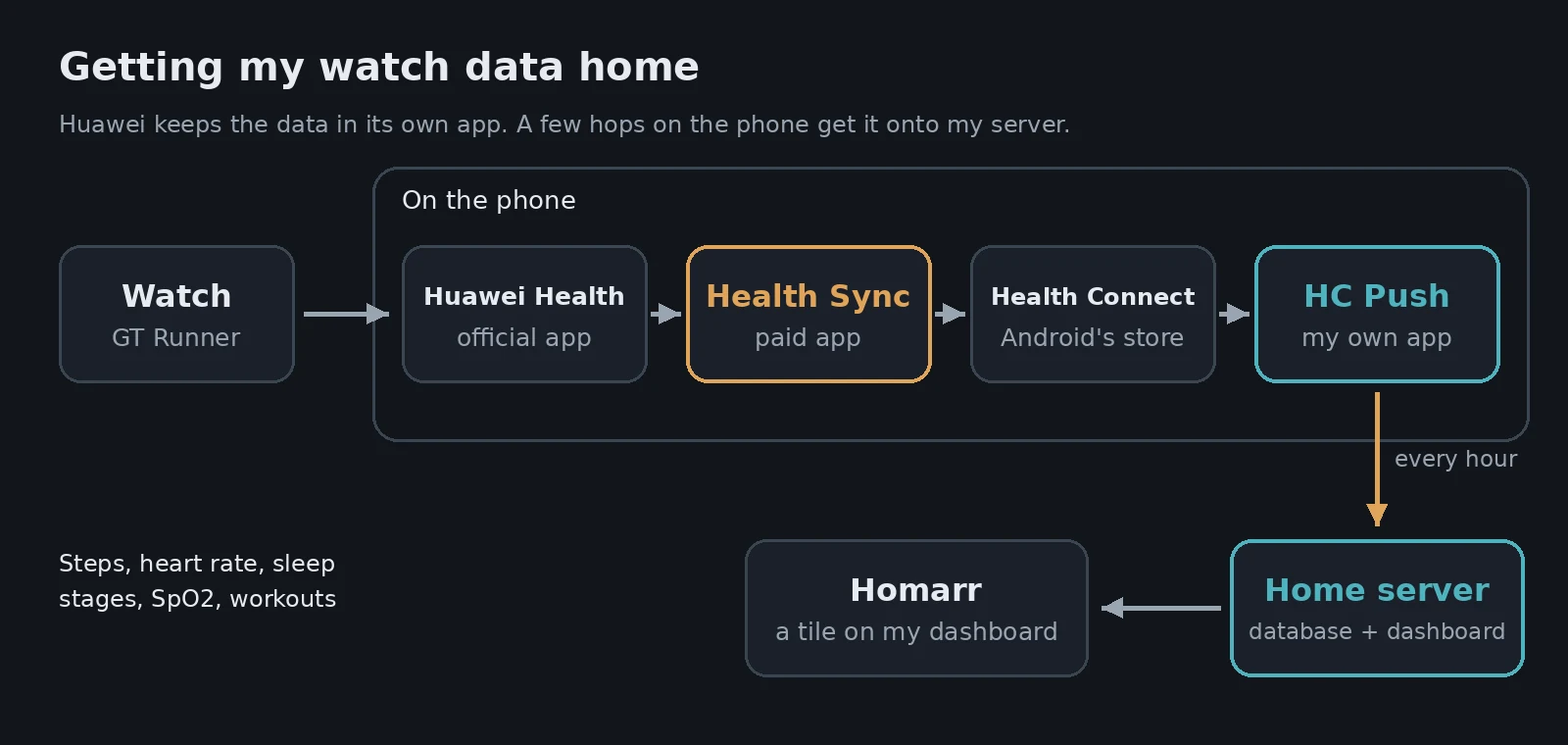
Health Sync is a paid app that reads from Huawei Health and copies everything into Health Connect. That keeps the Huawei app exactly as it is. Once the data is in Health Connect, any app with permission can read it. I went with this route and kept Gadgetbridge as a fallback.
HC Push: my own small Android app
There was still a gap: nothing reads Health Connect and sends the data to a server. So I wrote a small Android app, which I called HC Push. It does one job:
- Every hour, it asks Health Connect what has changed since last time.
- It sends the new readings as JSON to the server, with a secret token so nothing else can post data.
- The first run goes back 90 days, so the history arrives too.
On the server, a small Python app stores everything in an SQLite database and draws the dashboard. The Android app is built in a Docker container on the home server, so I don’t need Android Studio on any PC. I install it onto the phone over Wi-Fi with adb.
Tip Keep the key you sign an Android app with. If you build an update with a different key, Android refuses to install it over the old version, and you have to uninstall and start again.
What went wrong
The loop that never ended
The first three versions of HC Push got stuck. Health Connect hands back data in pages, with a token for the next page. On my phone (Android 13, where Health Connect is still a separate app), it kept returning the same page with a “next page” token, forever. The app asked about 1,200 times in a row, and Health Connect then blocked it for going over its rate limit.
Version 1.3 fixed it: it stops reading a type as soon as a page brings nothing new, or the token repeats. It also saves its progress, so a long history download picks up where it left off. If it hits the rate limit anyway, it backs off and tries again later instead of hammering.
Samsung freezing the app
Samsung’s battery saver is aggressive. It was freezing HC Push in the middle of a sync, along with Health Sync and Health Connect. I took all three off battery optimisation, and the syncs have kept up since.
Health Sync writing to the wrong place
For a while, only a couple of hundred step records reached the server. Health Sync was set to write to Google’s health service, not Health Connect. One setting later, everything started arriving.
What the dashboard shows
The first night after setup, my sleep came through with its stages (light, deep, REM and awake), along with heart rate, blood oxygen, distance and workouts.
A few things I added once real data arrived:
- Naps. A short sleep during the day shows as a nap, separate from the night, and the sleep tile says “+ 20m nap” or similar.
- “As of” times. Steps arrive hours later than everything else. That delay is on Huawei’s side, before the data ever reaches my phone’s Health Connect. So the steps tile shows when its newest reading was, and a low step count in the morning doesn’t look like a fault.
- A health check. The server reports a problem if no new data has arrived for 36 hours, so a broken sync doesn’t go unnoticed.
The Homarr tile shows today’s steps, last night’s sleep including naps, and my resting heart rate. Clicking it opens the full page.
Warning Health Connect doesn’t have everything the watch measures. There’s no stress reading and no sleep score, so those don’t appear on my dashboard. If a particular number matters to you, check that Health Sync can copy it before you pay for anything.
Was it worth it?
So far, yes. The data lives on my server, the Huawei app still works as normal, and the dashboard shows weeks of trends that the Huawei app makes awkward to see. The cost was the Health Sync licence and an evening of chasing a paging bug.
Next on the list: maps of my runs, and adding the dashboard to Uptime Kuma, the same way I watch my DNS server.
Leave a Reply